- Revenue Collection
- Revenue Leakage
- Government Technology
- Fintech
Stopping Revenue Leakage: 9 Controls Every Field Collection App Needs
Revenue rarely disappears in one big theft. It leaks through missing receipts, late deposits and unapproved waivers. Here are nine controls that close the gaps in a field collection app.
 Arsalan Sadiq 6 min read

Most revenue doesn't go missing in one big theft. It leaks out a little at a time: a receipt that was never issued, a payment recorded as less than it was, cash held for a week before it's banked, a business that was never added to the register.
Each leak is small. Across hundreds of officers and a full year, they add up to a large share of what a city or utility should be collecting.
A mobile collection app can close most of these leaks, but only if the controls are designed in. A digital form that copies the paper receipt book closes almost none of them. Here are the nine controls I'd insist on.
Where the money actually goes
Before the controls, it helps to name the leaks:
- Unrecorded collections. Cash taken without a receipt, or with a fake one.
- Under-recording. The receipt shows less than the payer paid.
- Late remittance. Collections held for days or weeks before reaching the treasury account.
- Unauthorised waivers. Discounts or exemptions given without approval.
- Missing payers. Businesses and properties that were never registered, so nobody ever asks them to pay.
- Ghost entries. Fake payers or fake visits that make an officer look busy.
Automation alone doesn't solve these. Kenya is a useful warning: counties have spent heavily on automated revenue systems, yet audit reports have found systems not connected to the national financial system, revenue figures still prepared by hand, and cash still collected after "going cashless". The software existed. The controls didn't.

The 9 controls
1. Every receipt comes from the system
No paper receipt books, not even "for emergencies". Every receipt carries a system-generated number unique to the device, so a gap in the sequence shows up straight away. If the app is down, collection pauses. That sounds harsh, but a backup paper book quickly becomes the main one.
2. The payer can verify their receipt
Print a QR code on each receipt that opens a public verification page showing the amount and date. Send an SMS copy from an official sender ID. Then tell the public, on posters, radio and the receipt itself: if you didn't get an SMS, call this number. Payers become your auditors, at no cost.
3. Cash limits for every officer
Give each officer a cash-holding limit, like a wallet with a ceiling. When they reach it, the app stops accepting cash until they deposit. This limits how much any one person can hold and how long they can hold it. Tiered limits work well: officers, then supervisors, then the bank, each with their own ceiling.
4. End-of-day reconciliation that can't be skipped
At the end of every shift, the officer's recorded cash must match the bank deposit or the cash handed to the supervisor. If it doesn't, the officer can't log in the next morning until it's resolved. This one rule turns reconciliation from a monthly accounting exercise into a daily habit.
5. A time and location on every transaction
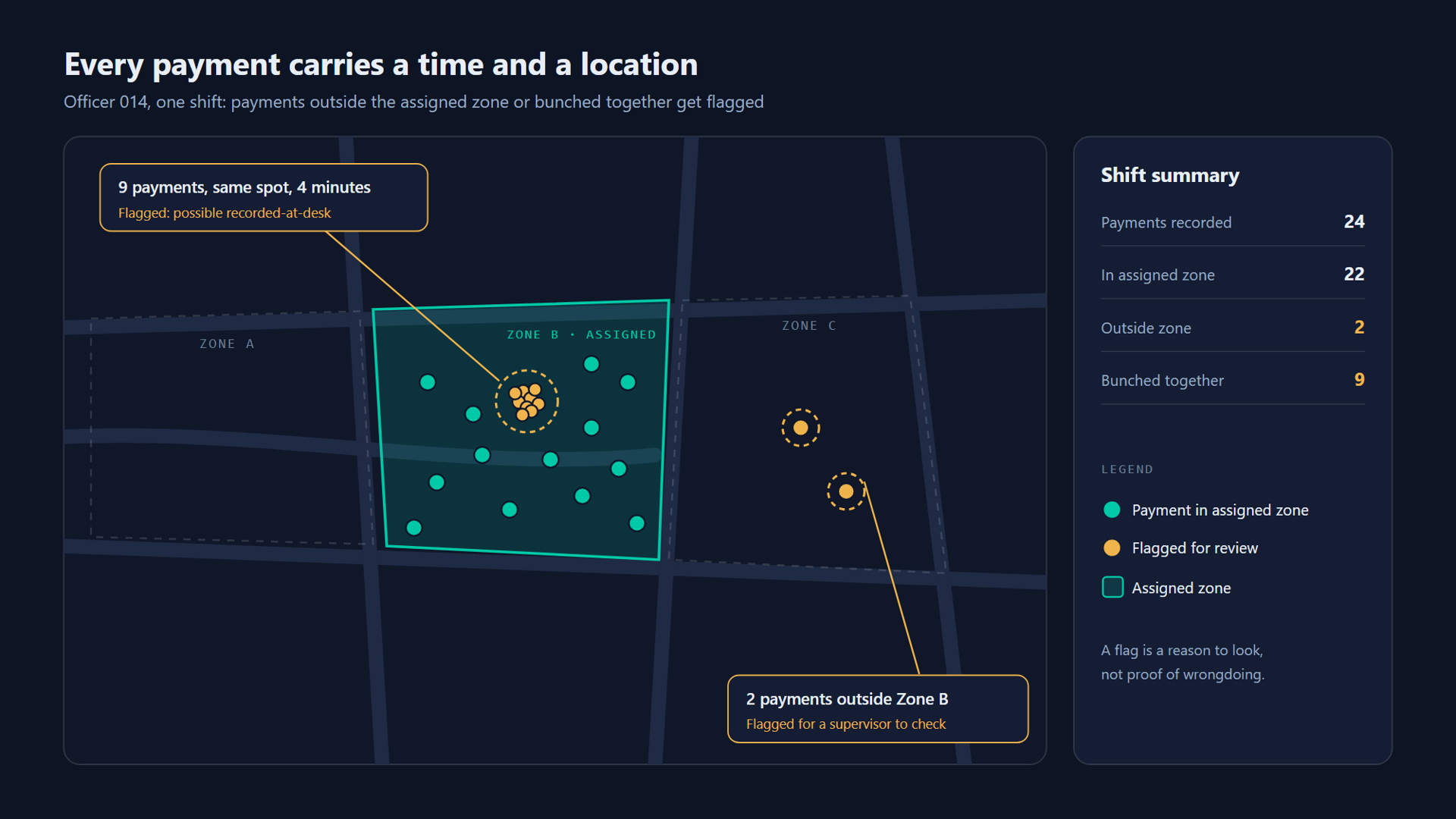
Record GPS and time on every payment and every visit. Flag payments made outside the officer's assigned zone, many payments recorded in the same spot within a few minutes, or visits logged when the device was somewhere else. Most officers are honest; this protects them as much as the treasury.
6. No silent edits
Payments can't be edited or deleted. Mistakes are fixed with a reversal record that needs a reason and a supervisor's approval. Every change, by anyone, goes into an audit log that nobody can rewrite, including system administrators.
I built the same principle into a data pipeline for onboarding banks and credit unions: every run was logged, and rows that failed checks went to a review queue instead of being quietly fixed. The domain was different, but the rule is the same. If a record can change without a trace, it eventually will.
7. Take the officer out of the money flow
The strongest control is the simplest: let the payer pay directly into the government's account by mobile money, bank transfer, card or QR code, while the officer only issues the bill and records the visit. The officer never touches cash, so there's nothing to leak.
This is where policy is heading. Nigeria's federal government has banned cash collection for federal revenue entirely and moved agencies to electronic payments and a unified electronic treasury receipt. Many local governments won't go that far yet, but every payment moved to a direct channel is one less to reconcile.
8. An exception dashboard, not just a totals dashboard
Totals tell you how much came in. Exceptions tell you where to look. The supervisor's first screen should be a short list:
- Officers collecting well below the average for similar zones
- Unusually high numbers of reversals or waivers
- Devices that haven't synced in more than a day
- Gaps in receipt sequences
- Payers who paid last year and haven't this year
9. Separate duties and rotate routes
The person who registers a payer shouldn't be the only person who collects from them, and nobody should approve their own reversals. Rotate officers between zones every few months. These are old audit principles; the app just makes them enforceable instead of optional.
Leak, control, signal
| Leak | Control | What the dashboard shows |
|---|---|---|
| Unrecorded collections | System receipts, SMS copies to payers | Payer complaints, receipt gaps |
| Under-recording | Payer verification page | Amount mismatches reported by payers |
| Late remittance | Cash limits, daily reconciliation | Cash held per officer, overdue deposits |
| Unauthorised waivers | Approval workflow | Waivers by officer and by approver |
| Missing payers | Enumeration, register matching | Properties or businesses with no payments |
| Ghost entries | GPS and time checks | Clustered or out-of-zone activity |

What software can't fix
Being honest about limits makes the rest more credible. An app can't fix collection targets nobody believes in, officers who haven't been paid, or a council that won't enforce against large defaulters. It also can't help if the vendor holds the collected money in its own account before passing it on. Funds should land in the government's account from the first day.
The best programmes pair the controls above with fair targets, visible enforcement and regular public reporting of what was collected and what it paid for.
How much are you losing?
If you want a rough number for your own programme, I built a free revenue leakage calculator. Enter your officer count, average daily collections and how much is paid in cash, and it estimates what leakage may be costing you and how quickly better controls would pay for themselves.
For the technical side of making these controls work without a signal, see Offline-First Collection Apps.
Sources
- Costly automation: fintechs bag millions as county revenues stagnate, Nation (Kenya)
- Cherargei demands enhanced oversight in county revenue automation systems over leakage concerns, People Daily (Kenya)
- FG phases out cash revenue collection, gives MDAs 45 days to deploy POS terminals, TheCable (Nigeria)
- Nigeria's POS mandate for government offices, TechCabal, December 2025
If you're reviewing an existing collection system and want an outside view of where it leaks, let's talk.
Views here are my own and don't represent any current or past employer or client. This is general information, not professional advice for your situation. Full disclaimer
Working on something similar?
I help businesses and founders design and build software like this. Book a free call or send a few details about your project.